CHEMBOX
Micro GC Fusion® Data Operating Tool
Make sense of your data
Chembox is the Micro GC Fusion® data processing software. It complements the on-board software features of Micro GC Fusion® for the realization of reaction kinetics, calculations, but also the monitoring of sensors associated with your processes.
CHEMBOX, follow your procedures at a glance
CHEMBOX is the essential tool for continuous process monitoring.
Chembox automatically recovers data from a Micro GC Fusion® that is added to the graphics you set. You choose the compounds and parameters to follow (area, concentrations, retention times...).
Chembox, too, is tracking your different flows from your multi-channel valve and tracking graphs of recalculated values.
Custom graphics?
It automates all stages of processing your data to obtain essential information, readable at a glance.
For example, the efficiency over time or the smooth running of a reaction through the correlated monitoring of the sensor data (pressure, temperature, pH) with the results of Micro GC Fusion®. This software replaces the manual processing of your data on a spreadsheet.

The CHEMBOX features several features for operating your data.
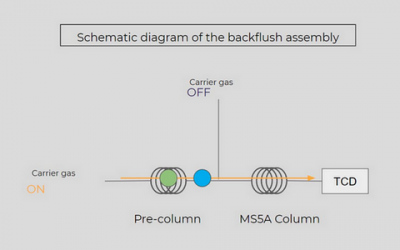
- Automatic backflow time adjustment
- Tracking chart: retention time, raw or normalized concentrations, peak areas
- Data export: image or csv format, synthetic file on selected range, standard report
- Data archiving: selection of analyses without size limit, deletion of analyses safely
The Science of VUV Detection: Beyond Traditional Chromatography
CHEMBOX is an automation system that does not require installation of any particular software or operating system. Without a license, it is a multi-user work platform to track your data from a Micro GC Fusion®.
It is connected via a LAN cable to one or more MicroGC Fusion® and recovers all your analysis results automatically.
It allows you to create tracking graphs of all the parameters available in Micro GC Fusion®: area, retention time, concentration, standardized concentration, peak amounts.
Options complement its features to adapt to your needs.
With the "Calculations" option, you can create your custom calculations that rely on available data from the Micro GC, so that you can track a particular performance or calculation over time.
With the "Captor" option, you can recover the values of the sensors you have and plot curves in the CHEMBOX. Sensor values are linked to Micro GC analysis and entered in the analysis file*.
A report is available for each analysis, with the chromatograms for each module and the parameters of the analytical method. The "Custom Report" option allows you to modify this report to your image.
You can use these options to view and track the parameters of your reactions at a glance.
*The analysis shall be started from CHEMBOX with declared and set sensors.
Details of options available for customization:
- Sensor option: allows you to add data from your sensors to complete your analytical data and have a global view of your results. Sensors must be able to transmit their data in Modbus TCP/IP. Adapters are available.
- Calculation option: allows to perform calculations from the data reported in the CHEMBOX and integrate them into your graphics. Calculations to be created in a calculator with the data available in the chosen method.
- Custom report option: lets you edit your analytics reports with your company logo and choose the data that appears.
- Toolbox option: allows to integrate custom developments to suit your needs (data processing, data recording in a LIMS, etc.)
- Offline option: Access a database identical to the Micro GC Fusion®'s "data browser" to work on all your data (chromatograms and results) without a connected analyser.